Promotions and Combos Management

General summary

This documentation will give an overview of the PromoFusion feature and also the process to manage Promotions and Combos, explaining how to properly use them.

Promofusion

The Promofusion is a functionality that doesn't need interaction from the zone. It provides information about deals/promotions/combos, aggregating data from others sources like Accounts, Items, Prices, and Product Assortment.

Promofusion functionality first verifies all the products available in the POC and search details of each product to be shown. Then the information of prices, available combos and available promotions are retrieved for the list of products. Finally, only the deals (Combos and Promotions) that have all necessary information are returned.

Promotions V2 management

Summary

Promotions MS is responsible for creating promotions and assign to an account.

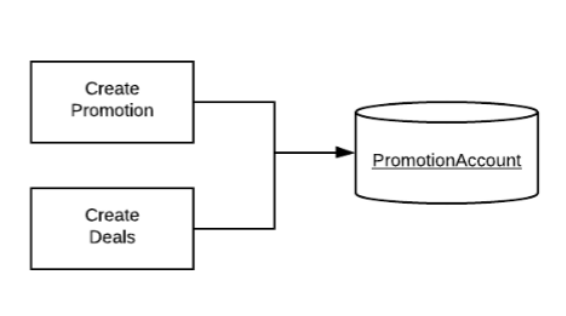
The Zone can Create, Update or Delete promotions by sending requests to promotion-relay V2. These requests are asynchronous, and they will be placed upon a queue for a post processor consumption. A Promotion contains only basic information (title, description, type...), it does not contain the rules for it. These rules are stored as Deals and they are required to make the Promotion available for the customer in the app, check the Deals Management section in Pricing Management documentation. The relation between both entities is made by the key promotionId from the Promotion entity and the promotionId from the Deal entity.

After sending information to both relays the PromotionAccount will be properly populated, see the diagram below.
Types of Promotions

Name

Description

Example

Discount

Simple price discount on the SKU

Buy Brahma 600ml, get 10% off

Stepped/Scaled discount

Simple price discount on the SKU, but by range

Buy from 1 to 10 units, get 10% off; buy from 11 (to infinity), get 20% off

Free Goods

Buy one SKU, get other(s) from a given list

Buy 1 Skol, get 1 Brahma or 2 Stella for “free”

Stepped/Scaled Free Goods

Buy one SKU, get other(s) from a given list, but by range

Buy from 1 to 10 Skol, get 1 Brahma or 2 Stella; Buy from 11 (to infinity) Skol, get 2 Brahma or 4 Stella

Flexible Discount

Buy multiple SKUs from a given list, to receive a specific amount of discount per SKU

Buy 5+ Stella to receive 10% of discount and Buy 10+ Budweiser to receive 7% of discount

Limits

Entity

Endpoint

Compressed

Limit of entities

generic-relay

/v2

no

1,500

Headers

For basic information of the microservices see documentation of BEES micro-services.

Other than the authorization and country header, the Promotion Relay has the following parameters below for all routes available.

Name

Description

x-timestamp

Timestamp generated in the source of truth of the data that will be used for setting precedence of message processing. This count starts at the Unix Epoch on January 1st, 1970 at UTC

requestTraceId

Cross transaction unique ID

Create Promotions

To create or update promotions, the zone needs to send a POST request to Promotion Relay endpoint with some information filled.

Highlight Fields

These are the main fields from body parameter and their meaning.

Name

Description

promotionId

Unique identifier for the promotion

type

The promotion type that can be one of the described at the topic Types of Promotions

title

The promotion title. The label displayed on the promotion screen at the application

description

The complete description of the promotion. It describes the promotion itself, about how the promotion works. Displayed when is opened the promotion product at the promotions screen

budget

The promotion budget

image

An image that will be used as background on the Promotion itself

quantityLimit

The promotion quantity limit

startDate

Day as of which the promotion will become active. It should be in UTC timezone

endDate

Day until which the promotion will become active. Needs to be > than Start date. It should be in UTC timezone

Delete promotions

To delete promotions, the zone needs to send a DELETE request to Promotion Relay endpoint with some information filled.

Highlight Fields

These are the main fields from body parameter and their meaning.

Name

Description

accounts

List of accountId related to some promotion

promotions

List of promotionId

accounts field is not required, but when is not filled the promotionId will be deleted for all accounts that it is related

Examples

This section contains valid examples of request bodies to Delete route in promotion-relay V2.

Delete a Promotion related to some account:

{
"accounts": [
"12345678"
],
"promotions": [
" Becks01"
]
}

Delete a Promotion for every account that it is related:

{
"accounts": [
],
"promotions": [
" Becks01"
]
}

Combos Management

Summary

Combos is a microservice to handle all promotions of type combos. The 3 types of combos are: Free Good (FG), Discount (D) and Digital Trade (DT). At the moment the combos MS is using both versions V1 and V2, one to create new combos and the other to delete.

Create Combos

To create Combos, a POST request must be sent to combo-relay V2 in one of the endpoints below.

Highlight Fields

These are the main field and their meaning.

Name

Description

type

tells the type of the combo (D, FG, DT)

featured

Integer that defines if a combo is relevant or not, appearing on the top of the screen or not. It’s going to be deprecated.

description

A description of the Combo, with more details on the deal. It is mandatory to have one of these filled in.

title

The Combo titles

externalId

Must be that same as the promotion id. It is used to link them.

originalPrice

Total price not including discounts nor taxes.

price

Total price of the combo including discounts without taxes.

Limits

Entity

Endpoint

Compressed

Limit of Entities

combos

/v2/accounts

no

10000

/v2/accounts

yes

50000

Note: Needs a performance test

Headers

For basic information of the microservices see documentation of BEES micro-services.

Other than the authorization and country header, the Combo Relay has the following parameters below for all routes available.

Name

Description

x-timestamp

Timestamp generated in the source of truth of the data that will be used for setting precedence of message processing. This count starts at the Unix Epoch on January 1st, 1970 at UTC

requestTraceId

Cross transaction unique ID

Examples

The Table 1 shows a partial payload of a Combo of type Discount.

{
"accounts": [
"12345678"
],
"combos": [
{
"id": "TEST01",
"title": "TEST01 with combos",
"description": "TEST01 type discount",
"type": "D",
"image": "https://some-site.com/sample.png",
"startDate": "2020-01-01T00:00:00.000Z",
"endDate": "2020-12-28T00:00:00.000Z",
"originalPrice": 1296.94,
"price": 1167.25,
"availableToday": 194,
"externalId": "TEST01",
"items": [
{
"sku": "000000000003001395",
"quantity": 1
}
],
"discountPercentOff": 10
}
]
}

Table 1: Combo of type discount

The table 2 shows a partial payload of a Free Good.

{ 
"accounts": [
"12345678"
],
"combos": [
{
"id": "TEST02",
"title": "TEST02 with free good only",
"description": "TEST02 with free good only",
"type": "FG",
"deleted": false,
"image": "https://some-site.com/sample.png",
"startDate": "2020-01-01T00:00:00.000Z",
"endDate": "2020-12-28T00:00:00.000Z",
"originalPrice": 1296.94,
"price": 1167.25,
"availableToday": 194,
"externalId": "TEST02",
"freeGoods": [
{
"quantity": 1,
"items": [
{
"sku": "000000000003000050"
}
]
}
],
"discountPercentOff": 10
}
]
}

Table 2: Free Good